Barcode Utility1.0.4
Publisher Description

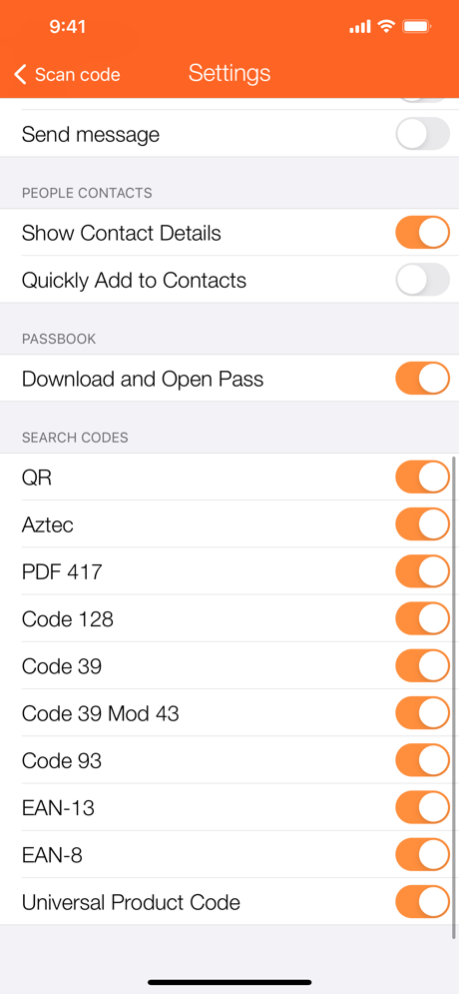
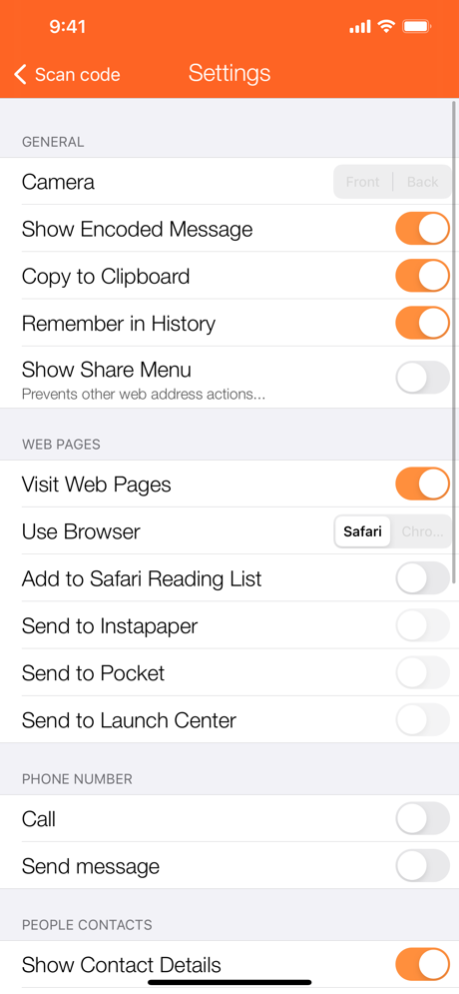
Barcode Utility, the ultimate barcode scanner for every type of code.
Supported barcode types:
- QR
- PDF417
- Aztec
- Code 39
- Code 39 mod 43
- Code 93
- EAN-13
- EAN-8
- UPCE: Universal Product Code
Feature list:
- Fast and efficient scanning.
- Store and export all scans, using simple text or comma-separeted file (CSV).
- Works with both rear and front camera.
- Automatically recognize different kind of data: simple text, links, contacts, passcode, etc.
- Support different action for each scan: view, copy, save on history, sharing.
- Open recognized links in Safari or Chrome.
- Send recognized links to Safari Reading list, Pocket, Instapaper or Launch Center Pro.
- Call or send messages to recognized phone numbers.
- View and save recognized contacts as vCard.
- Full support for Apple Passboook.
Barcode Utility allows fast and efficient scanning of a sequence of barcodes. You can export all barcodes in a simple text file or comma-separated file (CSV) using email, iMessage, AirDrop or sending files to other apps (like Dropbox, Google Drive, etc.).
Jan 18, 2021
Version 1.0.4
Support for the latest devices.
About Barcode Utility
The company that develops Barcode Utility is Dimension. The latest version released by its developer is 1.0.4. This app was rated by 1 users of our site and has an average rating of 5.0.
To install Barcode Utility on your iOS device, just click the green Continue To App button above to start the installation process. The app is listed on our website since 2021-01-18 and was downloaded 163 times. We have already checked if the download link is safe, however for your own protection we recommend that you scan the downloaded app with your antivirus. Your antivirus may detect the Barcode Utility as malware if the download link is broken.
How to install Barcode Utility on your iOS device:
- Click on the Continue To App button on our website. This will redirect you to the App Store.
- Once the Barcode Utility is shown in the iTunes listing of your iOS device, you can start its download and installation. Tap on the GET button to the right of the app to start downloading it.
- If you are not logged-in the iOS appstore app, you'll be prompted for your your Apple ID and/or password.
- After Barcode Utility is downloaded, you'll see an INSTALL button to the right. Tap on it to start the actual installation of the iOS app.
- Once installation is finished you can tap on the OPEN button to start it. Its icon will also be added to your device home screen.
Program Details
System requirements
Download information
Pricing
Version History
version 1.0.4
posted on 2021-01-18
Jan 18, 2021 Version 1.0.4
Support for the latest devices.
version 1.0.3
posted on 2017-12-11
Dec 11, 2017 Version 1.0.3
iPhone X support!
version 1.0.1
posted on 2014-09-08
version 1.0.4
posted on 1970-01-01
2021年1月18日 Version 1.0.4
Support for the latest devices.
version 1.0.3
posted on 1970-01-01
2017年12月11日 Version 1.0.3
iPhone X support!
version 1.0.3
posted on 1970-01-01
11 dic 2017 Version 1.0.3
iPhone X support!
version 1.0.4
posted on 1970-01-01
18 de Jan de 2021 Version 1.0.4
Support for the latest devices.
